JI-113C
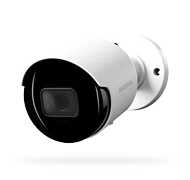
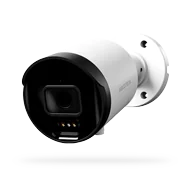
Network camera outdoor 5Mpx - turret
In MyJABLOTRON it automatically attaches video to an alarm event outdoors and indoors. It is connected by cable directly to the IP network on the premises, independently of the alarm infrastructure.
Product line
- JABLOTRON 100+
- JABLOTRON Mercury
Compatibility
JA-100K, JA-101K, JA-106K, JA-103K, JA-107K, JA-108K, JA-102K, JA-152KRY
Check compatibilityKey specifications
- Power supply
- - from PoE (48V) data connection (according to IEE 802.3af) - alternatively via 12 V DC power connector
- Quiescent current consumption
- 250 mA
- Maximum current consumption
- 458 mA
- Number of pixels
- 5 Mpix
- Camera resolutions and bitrates
- 1–5 MPx, 448–3072 kbps (according settings in app)
- FPS
- 15
- Lens
- 3.6 mm (91° angle of view)
Basic description
The camera gives you a view of the premises both live and from the recording. On a selected alarm event it creates a one-minute sequence and attaches it to the event in the application. No searching along a timeline; the user can tell from the clip what actually happened.
- Recording locally and securely in the JABLOTRON Cloud
- Powered over PoE or with 12 V
- 91° horizontal field of view
- Night vision with a range of up to 30 m
Why choose this product
A round-the-clock overview of what is happening on the premises
Cameras show who has come onto the premises, or what caused an alarm. Even remotely, it is easy to tell whether it is a mistake or a situation that calls for a response.
- A view of the premises from anywhere in the MyJABLOTRON application, live and retrospectively
- The option of providing the camera image to the Alarm Receiving Centre for alarm verification
Two recording options
The image can be recorded continuously and locally on a memory card inserted directly into the camera. For high-risk premises, JABLOTRON Cloud storage is available as well.
- Memory card = the recording stays on the premises only
- JABLOTRON Cloud = the recording is on a server off the premises, to the extent covered by the subscribed service
Exceptionally easy installation
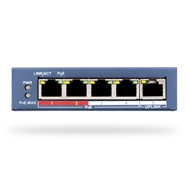
The camera is powered via the data cable (a PoE source is required) and connected to the internet by the same cable. It is linked to the alarm only in the JABLOTRON Cloud.
- A plug & play solution. It does not require a static IP address and, on a normally configured network, no changes to the router or firewall either
- Easy registration by scanning the QR code or typing in the MAC address in the MyCOMPANY application
- A request sent to the Alarm Receiving Centre with a single click
Frequently asked questions
Yes, it is intended for both indoor and outdoor environments and has IP67 protection.
No. The camera does not occupy a position in the system, it does not need its power supply, and the system monitors neither its status nor any interference with it. It serves for video verification of the events the system reports.
Technical specifications
- Power supply
- - from PoE (48V) data connection (according to IEE 802.3af) - alternatively via 12 V DC power connector
- Quiescent current consumption
- 250 mA
- Maximum current consumption
- 458 mA
- Number of pixels
- 5 Mpix
- Camera resolutions and bitrates
- 1–5 MPx, 448–3072 kbps (according settings in app)
- FPS
- 15
- Lens
- 3.6 mm (91° angle of view)
- Lens type
- M12 plate lens
- Sensing chip
- 1/2.7" Progressive CMOS
- WDR - half-light compensation
- yes
- Camera setup options
- horizontal: 91°, Vertical: 46°
- Communication interface
- LAN
- IR illumination range
- 30 m
- Environment
- outdoor general
- Operating temperature range
- -35 °C to +60 °C
- Average operating humidity
- up to 75 % non-condensing
- Degree of protection
- IP67
- Dimensions
- o 100 x 90 mm
- Camera weight
- 418 g
- Weight of socket
- 317 g
- In compliance with
- EN 55032, EN 50130-4, EN IEC 63000
Warning
- The manufacturer points out that, in connection with the possibility of making visual recordings by means of the camera, every user of it is obliged to comply with the duties laid down by legislation for the protection of individuals' privacy and personal data. Among other things, those regulations may impose a duty to obtain the consent of persons within range of the camera to visual recordings being made of them, or a duty to mark the space covered by the camera with information signs. The image cannot be stored on another recording system and the internal settings of the camera cannot be interfered with. A camera with an active Alarm Receiving Centre service cannot be removed from the system; a disconnected camera can only be removed after a manual reset. The camera may only be installed by a trained technician with a valid JABLOTRON certificate.
Installation example
Choose a position with the best view of the guarded area and with a way of running the cables.
Mark out the holes with the template supplied, drill them with a Ø 6 mm bit and fit the wall plugs from the package.
Run the cable through the centre or the side hole; close off the hole you do not use with the blanking plug.
Pull the network cable through the back part of the mounting socket and screw the socket to the wall with three screws.
Slide the waterproof cover onto the cable.
Crimp on the RJ-45 connector.
Plug the connector into the camera's LAN connector; without PoE, connect an external 12 V DC power supply (min. 0.5 A).
Loosen the camera mount by turning the ring anticlockwise.
Screw on the socket cover and then the mount to the socket with three screws.
Line the camera up in the counterpart of the mount, fit it and lock it by turning the ring.
Register the camera in the MyCOMPANY application and set its aiming.
Remove the protective film and polish the camera.
Help us improve the catalog
Missing something, or found a mistake? Let us know.