JA-152J MS II
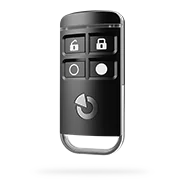
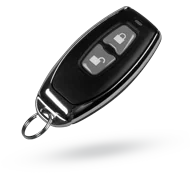
Bi-directional two-button keyfob
It unsets the alarm or opens the gate. A single remote control for anything.
Compatibility
JA-100K, JA-101K, JA-106K, JA-103K, JA-107K, JA-108K, JA-102K, JA-152KRY
Check compatibilityKey specifications
- Power – 1x lithium battery
- type CR 2032 (3.0 V/0.2 Ah) (Power supply C type according to EN 50131-6)
- RF range
- approx. 100 m (line of sight)
- Dimensions
- 63 x 36 x 15 mm
Basic description
A remote control with a fully configurable function for both of its 2 buttons. It can control the setting of selected sections or appliances connected to the system, such as a gate, a garage door or the lighting in front of the garage.
- Up to 3 independent functions (2 buttons and 1 simultaneous press)
- Visual and acoustic confirmation that the command has been carried out. Even round the corner, you will know whether the system has been set.
- Easy to operate even blind, from a pocket or while driving
- A single remote control works with several systems: at home, in the office and at the weekend cottage
Why choose this product
Lots of options in a single fob
The pair of buttons is typically used to switch the alarm on and off, but their function is fully configurable. Do you need one button to control the garage door and the other the light? No problem. For combined control of both setting and appliances, a four-button version is also available.
- The option of controlling all sections at once, including part setting (the first press part sets the selected sections, the second fully sets them, just like a control segment)
- Control of PG outputs with a single button (pulse / change of state / copying the press) or with a pair of buttons (the left button switches on, the right switches off)
- Triggering a silent or audible hold-up alarm with a single button or with a simultaneous press.
Frequently asked questions
The remote control confirms that the command has been carried out with a flash of the LED and a beep, right in your hand. Outside the RF communication range, however, it signals neither a change of state nor a loss of signal, so if the remote control shows nothing, repeat the command closer to the control unit.
It can, as long as the button lock is disabled, and it is disabled by default. When you enable the lock, the remote control only sends a command after a quick double press, so an accidental press in a pocket will no longer set or unset the system.
Technical specifications
- Compatible with
- FW of the JA-11xR module LR6x613+ FW of the control panel LJ(MD)60416+ F-Link 1.4.0+
- Power – 1x lithium battery
- type CR 2032 (3.0 V/0.2 Ah) (Power supply C type according to EN 50131-6)
- - Nominal consumption
- 1,1 µA
- - Maximal consumption
- 33 mA
- Low battery voltage detection
- ≤ 2.2 V
- Typical battery lifetime
- approx. 2 years (10 activations/day)
- Communication frequency
- 868.1 MHz, JABLOTRON protocol
- Maximum radiofrequency output (ERP)
- 1.2 mW
- RF range
- approx. 100 m (line of sight)
- Dimensions
- 63 x 36 x 15 mm
- Weight without the battery
- 32 g
- Classification
- Security grade 2/Environmental class II (According to EN 50131-10)
- Environmental
- Indoor general
- Operational temperature range
- -10 °C to +40 °C
- Average humidity
- 75 % RH, non-condensing
- Number of unique production codes
- >1 Million
- Certification body
- Trezor Test s.r.o. (no. 3025)
- Additionaly in compliance with
- ETSI EN 300 220-1,-2, EN 50130-4, EN 50130-4, EN 550, EN 62368-1, EN 50581, EN 50131-1, EN 50131-3, EN 50131-5-3, EN 50131-6
- Can be operated according to
- ERC REC 70-03
Warning
- The remote control requires minimum firmware versions of the control unit, of the radio module and of the F-Link program; check them against the parameter table before installation, not at the customer's premises. The control unit must have a JA-11xR radio module.
Installation example
Switch the control unit to service mode.
In the F-Link program, select a position on the Devices tab and switch on enrolment mode with the Enrol option.
Press and hold the pair of buttons A and B at the same time for longer than three seconds, until the yellow LED flashes rapidly; a longer flash confirms that the enrolment signal has been sent.
Release the buttons and switch off enrolment mode on the control unit. The remote control can also be enrolled by entering the serial number from the label inside the remote control on the battery housing.
In the Internal settings of the position, assign functions to the individual buttons, the pair and the simultaneous press, and for each function select the sections or PG outputs it should apply to.
To enable the button lock, hold down both buttons until the yellow LED flashes rapidly; then release button B and press it again. A double flash and a double beep confirm that the lock is enabled; disable it with the same procedure.
Switch off the acoustics with the same procedure, but hold the buttons until the yellow LED starts flashing for the second time.
When replacing the battery, unscrew the two screws of the rear cover, remove the cover plastic with the metal loop and take out the battery; before inserting a new one, press any button several times to discharge the residual capacity.

Help us improve the catalog
Missing something, or found a mistake? Let us know.